


Verizon Family
4.47.90K Reviews
App Specs
- Version
- Varies with Device
- Updated On
- License
- Free
- Downloads
- 1,000,000+
- Developer
- Verizon Consumer Group
- Categories
- Lifestyle
- Platform
- Android, iOS
Screenshots

 Analysis by AppCompare
I see Verizon Family as a practical set of parental tools rather than a substitute for talking with your kids. Its strongest appeal is bringing location awareness and device boundaries into one family-focused app. That can make busy routines easier to manage, but it also asks parents to think carefully about privacy and trust. I’d recommend it most to families who want a shared safety routine, not to anyone hoping an app can solve every screen-time disagreement on its own.
Where it helps in an ordinary week
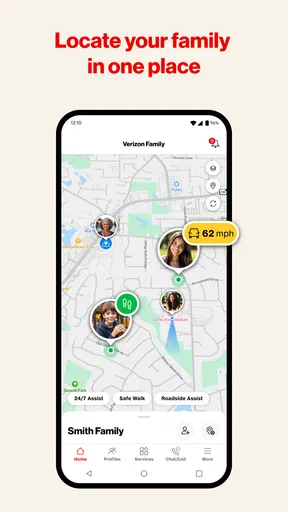
The value of location tools is clearest when a child starts getting around independently. Imagine a parent finishing work while a teenager takes the bus home or walks from an activity. A location check or an arrival alert can help answer the practical question of whether the journey is progressing as expected, without requiring repeated “Where are you?” messages. It is a small convenience, but one that can reduce needless worry when plans are familiar and everyone understands how the feature is being used.
Alerts work best when they mark places that matter to your routine, rather than turning every movement into a reason to check the phone. I’d start with a small number of useful arrival or departure points and agree with your child what those alerts mean. That keeps notifications tied to a real purpose—such as confirming a routine trip—rather than making location sharing feel like constant surveillance. If plans change, a conversation is still more useful than treating an alert as the whole story.
The screen-time controls also make more sense when they support a family agreement. A daily limit can help make a boundary consistent, while pausing internet access can be a direct way to stop recreational browsing during a planned break. I would explain the rule before relying on the control, especially with older children: an unexpected pause can feel like punishment, even if the parent intended it as a reminder. The tool can reinforce a decision, but the reason for the decision should come from the family.
Use the controls with a little planning
One useful approach is to decide which problem you are trying to solve before changing settings. If evenings are difficult, focus on the screen-time boundary rather than adding extra location checks. If the concern is a regular trip, set up a relevant location alert instead of checking the map repeatedly. Keeping the purpose narrow makes the app easier to manage and gives children a clearer sense of what is being monitored and why.
Content filtering is another area where expectations matter. Blocking selected sites or categories can add a layer of protection, and a browsing summary may help a parent spot a subject worth discussing. I would treat that summary as a prompt, not a complete record of a child’s online life or proof of intent. Context matters: a site visit can reflect curiosity, a school task, or an accidental click. A calm question will usually tell you more than jumping straight to a restriction.
Before using any parental-control tool, it is worth agreeing on who can see what and when the rules might change. Younger children may need closer guidance, while older ones often respond better when they have a say in the boundaries. Revisit the arrangement as routines and responsibilities change. That makes monitoring feel less like a permanent judgment and more like support that can be adjusted as a child grows.
Worth Reading Before You Choose

EA SPORTS FC Mobile 26 Is a Bigger Football Game, but It Takes Time

Flipboard Shows What News Apps Must Do Beyond the Feed

Switching to Android Auto Means Rethinking Your Driving Routine

Google Calendar Makes a Crowded Week Easier to Manage

Ludo King Makes the Most of the Minutes Between Plans

Baby Panda World Brings Quick Play to Modern Phones, but Its Game Library Feels Busy
What’s the Deal with Verizon Family?
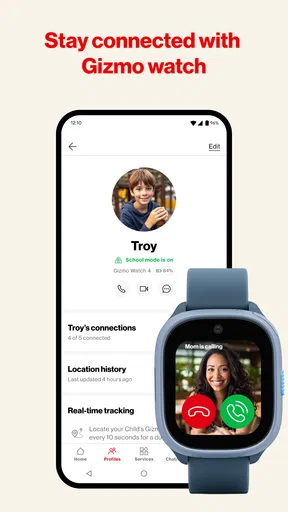
First things first, Verizon Family is designed to help parents manage their kids’ digital lives. It’s available for both Android and iOS, so you've got options. The app promises to give you peace of mind by letting you know where your kids are, what they’re up to online, and how they’re using their devices.
Features That Stand Out
Let’s talk features. One of the biggest selling points of Verizon Family is the location tracking. You can easily see where your kids are in real-time, which is a huge relief if you’re the kind of parent who constantly worries. The app also lets you set up location alerts, so you get a notification when your kid arrives or leaves a specific place.
Now, onto screen time controls. This app lets you set limits on how long your child can use their device each day. You can even pause the internet on their device if they’re getting too sucked into their screen. It’s like a digital timeout!
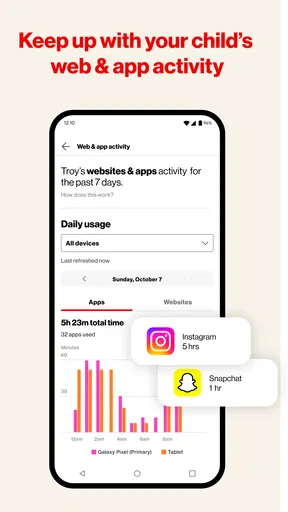
Another feature that I found pretty useful is the content filtering. You can block certain websites or categories of sites, making it easier to shield your kids from inappropriate content. Plus, you can get a summary of what sites they’ve visited, so you always know what they're up to online.
The App Experience
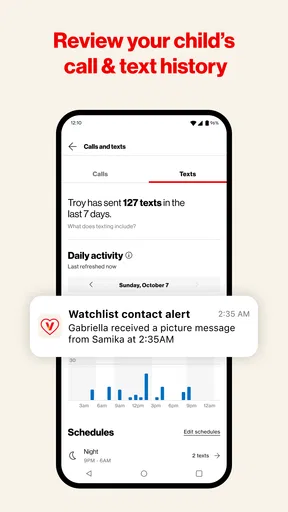
Setting up the app was a breeze. The interface is clean, and navigating through the different features is straightforward. Even if you’re not super tech-savvy, you’ll find it easy to get the hang of it. The app also sends regular reports to keep you in the loop, and I found these to be incredibly detailed and helpful.
But let's get real for a sec. Not everything is perfect. While the app does a lot, it can sometimes feel a bit invasive. You’re tracking your kids’ every move, which might not sit well with everyone. There's a fine line between protecting your kids and hovering over them, and this app walks that line.
How it compares with other options
Compared with relying only on a phone’s built-in family settings, Verizon Family puts location, screen boundaries, and web filtering into a more parent-oriented routine. That can be appealing if you would rather check one family tool than piece together several separate controls. The trade-off is that a broad dashboard can encourage more checking than a simpler setup needs. If your main concern is only bedtime screen use, the device’s existing controls may be enough; if you want several kinds of oversight together, this app is more relevant.
It also serves a different purpose from a basic map-sharing app. A map can help family members coordinate where they are, but it does not address the screen-time and web-filtering concerns described here. Conversely, families who only want occasional location coordination may find the extra parental controls unnecessary. I would choose based on the actual issue at home, not on the assumption that more monitoring automatically means more safety.
Who should consider it—and who may not
This is a better fit for parents who are introducing a child to independent travel, trying to make device limits predictable, or looking for a way to discuss online habits with more context. It can be useful when caregivers need a common approach, provided they agree on the rules and explain them to the child. Verizon Consumer Group develops the app, and its lifestyle focus is clear: it is meant to support family routines, not to replace a dedicated conversation or a parent’s judgment.
I would hesitate if your family prioritizes a high degree of privacy, if your child is old enough to manage boundaries through discussion alone, or if monitoring is likely to intensify conflict. In those cases, a limited screen-time setting—or no monitoring app at all—may be a better starting point. It is also worth remembering that location information and online summaries are only pieces of a larger picture. They can guide a conversation, but they cannot establish every detail of what happened.
Questions worth settling before setup
Parents often wonder whether the app is only useful for location. It is broader than that: the tools discussed here include location awareness, screen-time limits, internet pausing, and website or category filtering. That makes it more suitable for families who want several kinds of support than for someone seeking only a map. I would choose the features that address a real concern and leave the rest alone until there is a reason to use them.
Another practical question is whether the app costs anything or is limited to one mobile platform. It is free, and it is offered for Android and iOS. It is rated for Everyone, though that age label describes the app’s content rather than deciding whether a particular child is ready for parental monitoring. The best choice still depends on your family’s ages, expectations, and willingness to talk openly about the settings.
Verizon Family sits in the lifestyle category, has an average rating of 4.5 from around 34,000 ratings, and has been installed over a million times. Those figures suggest that many people have considered it, but they do not tell me whether its approach will suit your household. I would use them as background, then judge the app by whether its controls make a specific routine calmer rather than more contentious.
The App Experience
Setting up the app was a breeze. The interface is clean, and navigating through the different features is straightforward. Even if you’re not super tech-savvy, you’ll find it easy to get the hang of it. The app also sends regular reports to keep you in the loop, and I found these to be incredibly detailed and helpful.
But let's get real for a sec. Not everything is perfect. While the app does a lot, it can sometimes feel a bit invasive. You’re tracking your kids’ every move, which might not sit well with everyone. There's a fine line between protecting your kids and hovering over them, and this app walks that line.
Does It Live Up to the Hype?
So, is Verizon Family worth the download? If you’re a parent looking for a way to balance your kids' digital life while keeping them safe, it’s definitely worth considering. The location tracking and screen time controls alone offer a lot of value.
However, if you’re concerned about privacy and want to encourage your kids to build their own sense of responsibility without constant monitoring, you might want to think twice. It’s all about finding that balance that works for your family.
In the end, it’s all about what you need as a parent. If peace of mind and a bit of control over your kids' digital lives sound appealing, give it a try. But remember, no app can replace good old-fashioned communication with your kids.
So, what’s your take? Would you give it a shot or pass on it? Let me know your thoughts!
My verdict
My main reservation is that the same convenience that makes these tools useful can tempt a parent to check too often. I’d treat location alerts and reports as aids for a particular routine, not as a running judgment of a child’s choices. Set expectations together, keep the rules proportionate, and be willing to ease them as your child becomes more independent. Used that way, the app can support practical safety and healthier device habits without pretending to replace trust.
Pros
- User-friendly interface for easy navigation.
- Real-time location tracking with alerts.
- Customizable screen time limits for kids.
- Comprehensive activity reports available.
- Supports multiple devices for family use.
Cons
- Subscription required for full features.
- Location tracking drains device battery.
- Interface may lag on older devices.
- Limited parental controls for app usage.
- No offline functionality for location services.
FAQs for Verizon Family
What is Verizon Family and what features does it offer?
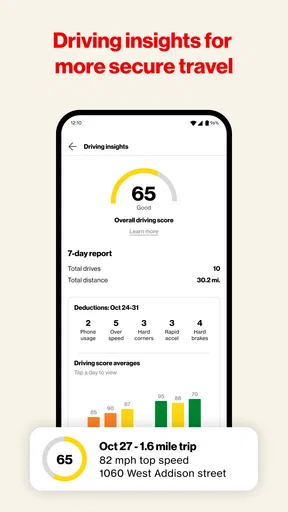
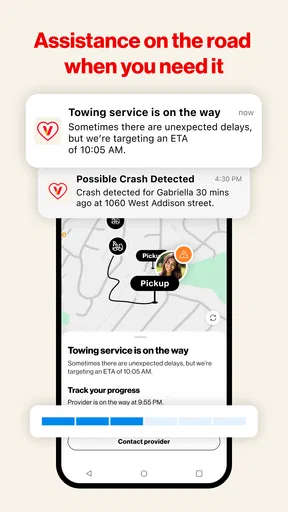
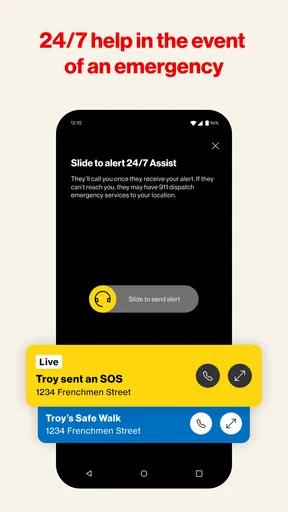
Verizon Family is a comprehensive app designed to help families stay connected and manage their digital lives. It offers features like location tracking, screen time management, content filtering, and driving insights. These tools aim to promote safety and responsible digital habits, making it a great choice for families looking to maintain a secure and balanced online presence.
How does location tracking work in Verizon Family?
The location tracking feature in Verizon Family allows parents to view the real-time location of their family members. It uses GPS technology to provide accurate updates and can send notifications when a family member arrives at or leaves a designated location. This feature helps ensure the safety and whereabouts of loved ones.
Can Verizon Family help manage screen time effectively?
Yes, Verizon Family includes screen time management tools that allow parents to set limits on device usage. Parents can schedule device-free times, monitor app usage, and even pause the internet on their child’s device. These controls help encourage a healthy balance between screen time and other daily activities.
What content filtering options are available in Verizon Family?
Verizon Family offers robust content filtering options that allow parents to block inappropriate websites and apps. Parents can customize filters based on age-appropriate categories and receive alerts if their child attempts to access restricted content. This feature helps ensure a safe and suitable online environment for children.
Is Verizon Family compatible with both Android and iOS devices?
Yes, Verizon Family is compatible with both Android and iOS devices. This cross-platform availability ensures that all family members can be connected, regardless of the type of device they use. Users can download the app from the Google Play Store or the Apple App Store to start enjoying its features.


